This is the simple loop.
Three surfaces. Patient logs. Patient reviews. Therapist walks in knowing. Everything else in the system exists to make this loop faster and more honest.
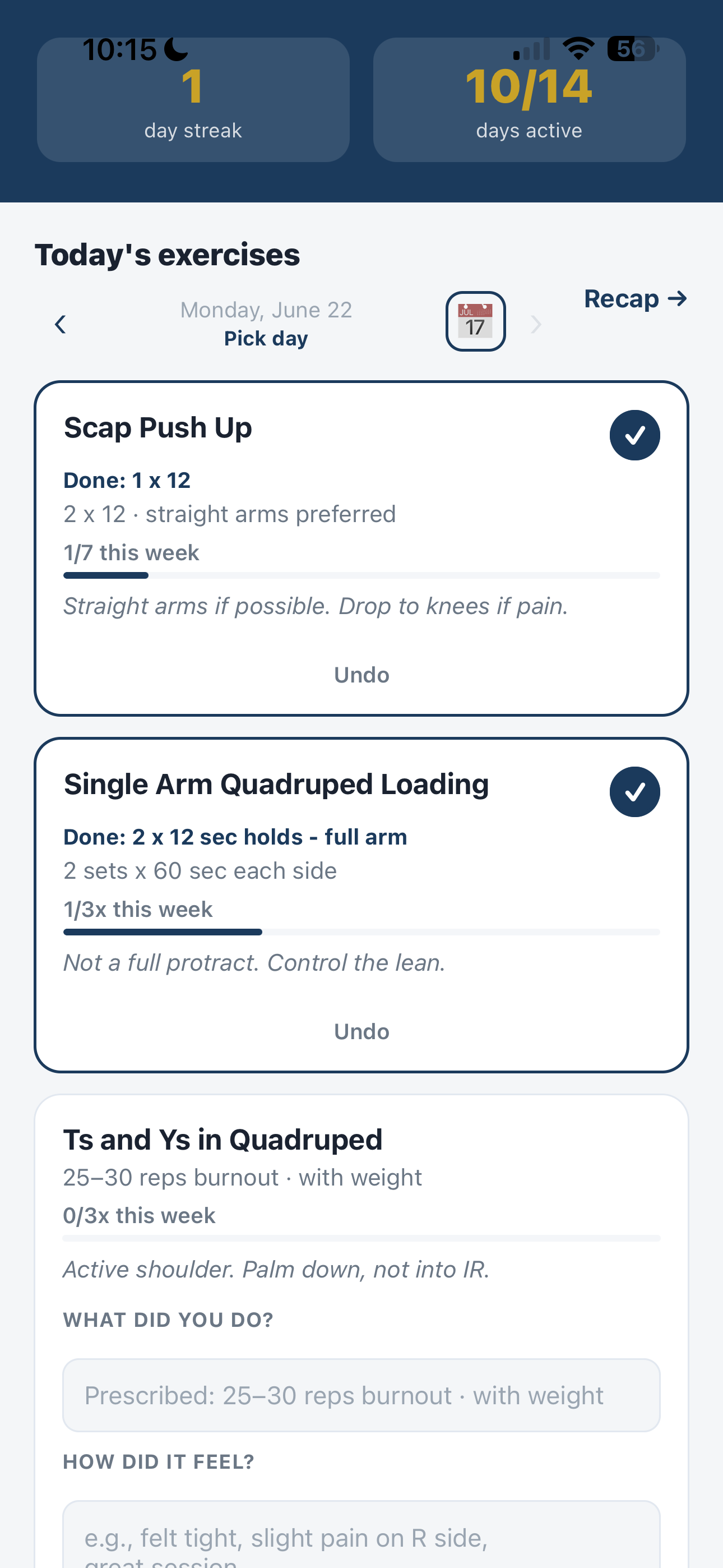
Mark done. Enter what they actually did. Note how it felt. Skip with a reason when they need to. Cadence shows the week’s goal.
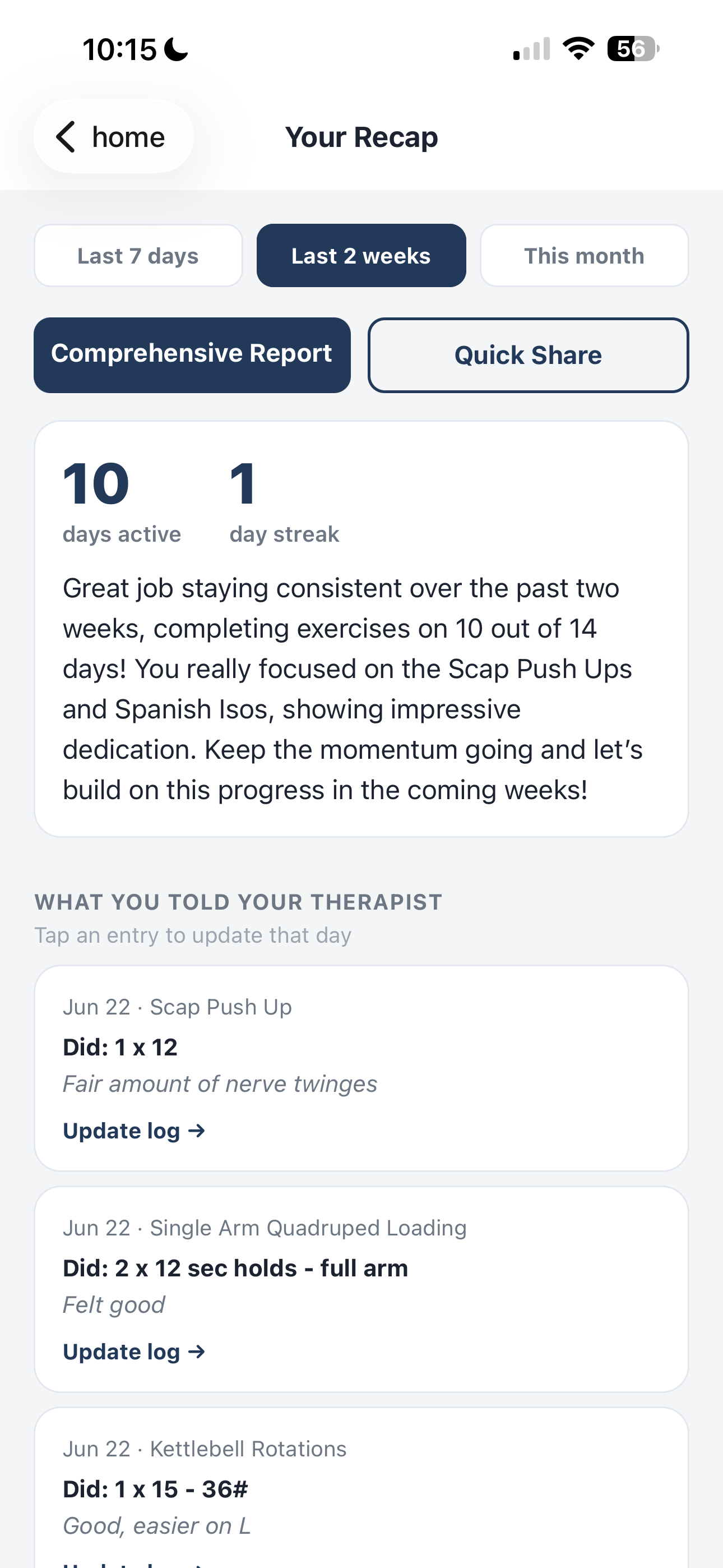
Days active, streak, check-ins, and notes in their own words. Open Comprehensive Report. Share a short link if they want. Nothing required to chase.
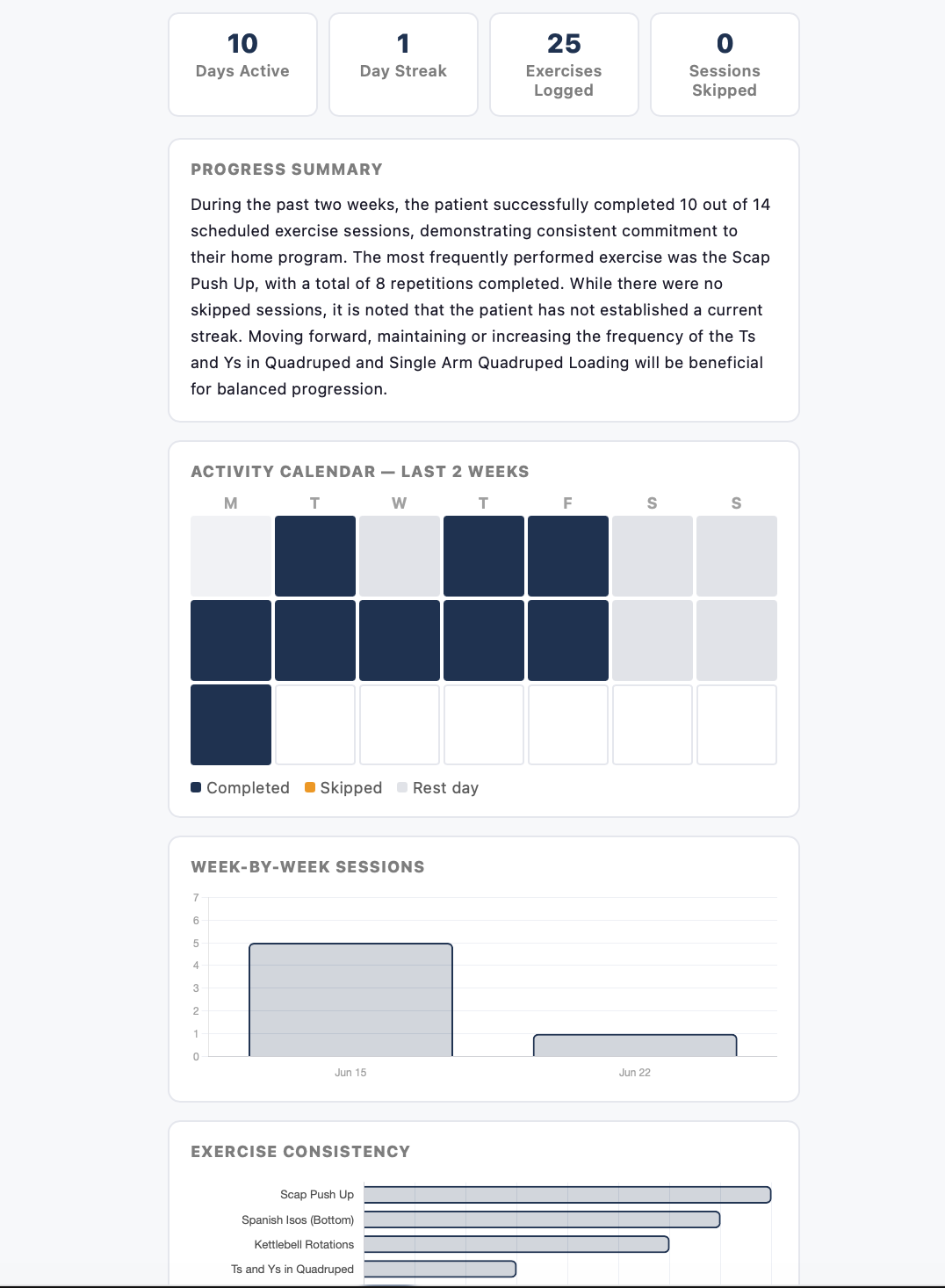
Risk badge, pain flags, AI summary, calendar, exercise consistency, daily check-ins, skipped-with-reason, and every note. Auto-logged in Therapist Hub. Copy a chart note for the EMR.
The full system. Not a logging toy.
This is what a Streamlined 360 clinic actually gets when Session Recap is on. Built for cash-based PT and OT clinic owners. One app for patients. One hub for therapists. Wired into the systems you already run.
| Piece | What it does | Who uses it |
|---|---|---|
| Patient app | iOS + Android. Clinic logo and colors after login. Daily log, reminders, check-in, demos, recap, report. | Patient |
| Therapist Hub | Roster, drop-off risk, program editor, demo record, AI cues, HEP library, reports, progress media. Phone, iPad, or laptop. | Therapist / CEO |
| Comprehensive report | AI narrative, calendar, consistency chart, notes, pain flags, short share link, chart-note copy. | Both |
| HEP library | Clinic video library. Favorites by body part and diagnosis. Assign to a patient in one pass. | Therapist |
| In-room progress | Capture, compare, branded before/after cards. Clinical consent and marketing consent are separate. | Therapist |
| S360 install | Pre-eval intro, post-eval provision, invite the same day. CEO toggle. Off by default until you turn it on. | VMM + CEO |
What the patient actually does in the app
Cash patients are paying out of pocket. They will do the work if the app stays quiet and useful. Session Recap is a habit, not another portal.
- Prescribed exercises from their therapist, with parameters and a cadence bar for the week.
- Mark done with what they actually did (reps, hold time, load), not only the prescription.
- How it felt in their words. That text is what the therapist reads before the visit.
- Skip with a reason (pain, time, travel, custom). Skips are labeled as logged reasons, not silent gaps.
- Watch demo in-app when the therapist recorded a video. Play and pause. No scavenger hunt through texts.
- Patient writes how they remember to do it right. “Squeeze glutes at the top. Don’t let the knee cave.”
- Stays on that exercise every day. Auto-saves when they pause. Survives between visits.
- Therapist cues stay separate: “From your therapist” is staff notes. Reminders are the patient’s own.
- A feeling note for the day even if they did not log a set.
- Shows on recaps, comprehensive reports, and Therapist Hub.
- Gives the therapist the “how are they actually doing” line that a skip or a silent day never captures.
- Add a home exercise they found or already do. Title, optional video, notes. Badge: “You added this.”
- Share a link (article, video, document) with the therapist.
- Therapist sees new patient-added work on the next report and can ask about it, or pull it into the prescribed program.
- Last 7 days, 2 weeks, or this month. Days active, streak, notes, custom exercises, shared links.
- Comprehensive Report opens a full clinical page: summary, calendar, consistency, check-ins, pain flags.
- When the report loads, the URL shortens. Apple Share (or Share Report) sends a short link, not a 500-character token.
- Therapist already has it in Hub. Patient sharing is optional, not the workflow.
The therapist side is a full program desk
Therapist Hub lives in the browser. Phone, iPad, laptop. No extra EMR login. No desktop-only admin. Changes go live in the patient app immediately.
Roster that tells you who is slipping
Every assigned patient, filters, pagination. On-track, watch, or at-risk using the same scoring you see on the report. Last active date. Engagement. Pain flags. You do not hunt through texts to find who went quiet.
Before the session
- Open the patient
- Read the latest report or chart-note copy
- See skipped-with-reason vs completed
- Walk in with a plan, not a quiz
Build and change the program between visits
Add exercises, parameters, cadence, staff notes. Attach a demo. Assign from the clinic HEP library. Save a good exercise back into the library. Patients see the new card the next time they open the app.
On the exercise card
- Title, sets/reps or hold, weekly cadence
- Therapist form cues (typed or AI-drafted)
- Demo video from your phone
- Patient reminders stay theirs
Record the demo. AI drafts the cues.
Therapist taps Record, walks the movement with a voice-over, stops. Video goes to Cloudflare Stream and lands on the patient card. Narration is transcribed. AI drafts “Form cues” and “Watch for.” Therapist reviews, edits a line, hits Apply. Patient sees structured notes, not a rambling paragraph.
AI cue flow
- Record on any device
- Whisper transcribes on our server
- GPT drafts cues under a signed BAA
- You apply. Patient sees it pinned
Clinic HEP library
Stop rebuilding the same 12 videos for every new patient. Quick-add a video. Favorite by body part or diagnosis. Assign a set to a patient. Internal JSON import for VAs seeding a library. Patients do not manage the library. They receive the program you prescribe.
Library admin
- Name, URL, body part, parameters
- Favorites for fast assign
- Bulk import for clinic seeding
- Save a live exercise back to the library
The comprehensive report is the visit brief
This is what “already knowing” looks like on paper and on a phone. Generated from real logs. AI reads the patient’s words (note text, exercise title, date only). Never the patient name.
-
One-glance status
On Track, Watch, or At Risk. Same language as the Hub roster. Recency, engagement, trend, unaddressed pain.
-
Pain and symptom flags
Notes that mention pain or symptoms are pulled to the top. Review those before you start the session.
-
Honest skip labeling
Completed vs skipped with a logged reason. Silent non-completion is not dressed up as “0 skipped.”
-
Calendar and consistency
Week rows for the range. Exercise consistency chart. Scrolls on mobile instead of getting cut off.
-
Copy for the chart note
Plain-text EMR paste: dates, completed, skipped-with-reason, check-ins, flags. No PDF archaeology.
-
Short share link
Report URL swaps to a short link after load. Safari Share or the Share Report button. Therapist does not need a login to open it.
Show progress in the room. Save the moment.
Home logging is half the story. The other half is proof in the treatment room. Capture, compare, export a branded card. Clinic controls clinical consent and marketing consent separately.
Capture from any device
Record in the room or upload a clip. Each visit lands on the patient timeline with a label and date. Phone, iPad, or laptop through Therapist Hub.
Compare side by side
Pick before and after. Synced playback, slow-mo, scrub to the frame that shows the change. First to latest presets when you are in a hurry.
Save this moment
One tap builds a high-res PNG with your clinic logo and colors. Archives to saved cards. Star favorites. Re-download anytime.
Consent is not a gray area
Clinical consent unlocks capture. Marketing consent unlocks share-ready clips for social and ads. Both are collected in the patient app at registration.
One store listing. Their clinic on the home screen.
Patients download Session Recap from the App Store or Google Play. After login they see your name, logo, and colors. Pulled from Streamlined 360 onboarding. No per-clinic store listing. No extra app for you to maintain.
Wired into Streamlined 360. You turn it on once.
Session Recap is complimentary for Streamlined 360 clinics. It stays off until you opt in. When it is on, it rides the emails and forms you already run.
Post-eval submit creates the patient, assigns the therapist, fires the invite. Your therapist builds the program once. Logging and reporting run after that.
The first 14 days, if you are the first clinic on this
This is the install we run with you. Not a software dump. A week of real patients on a real program.
Accountability is the product. Revenue is the side effect.
Better home compliance is not a dashboard vanity metric. It changes the visit, the package conversation, and the discharge cliff.
Better outcomes, faster
Patients who log do more of the work. More work means faster progress. The therapist looks prepared because they are.
Packages and renewals
When compliance data shows momentum, continuing care is a trend conversation. You are not selling a leftover package. You are showing the next block of work.
Continuity after discharge
The streak and the program can keep going. Home work is the bridge between active care and long-term retention, not a printed sheet that dies in a drawer.
Reviews and referrals
Patients who felt accountable and got results are the ones who write the review and send the friend. Session Recap is the proof trail.
What this is not
We built a quiet compliance layer. We did not build another clinic OS.
-
Not an EMR
Copy a chart note out. Do not replace Jane, PTEverywhere, or your notes system.
-
Not messaging or scheduling
No in-app chat. No booking. Those stay in GHL and your calendar.
-
Not a public wellness app
Downloading from the store does nothing without a clinic invite. No random sign-ups.
-
Not 12 unused reports
One comprehensive report. One Hub roster. One 10-second glance. That is the product.
-
Not a per-clinic App Store listing
One Session Recap app. Your brand after login. We maintain the store builds.
-
Not a surprise HIPAA experiment
Patient data on DigitalOcean. OpenAI used under a signed BAA for summaries and cue drafts. Minimum necessary in prompts. Clinic toggle and addendum before go-live.
Support: team@virtualmarketingmastery.com. Privacy: sessionrecap.app/privacy.
Invite-only. No random sign-ups.
Patients cannot create an account without a personal link from their clinic. If you are a clinic owner reading this, that is the point. We install this inside Streamlined 360. We do not sell a lonely app login.
See how VMM builds this for your practice